Everything a studio runs on
No modules to buy separately, no "available on the Enterprise plan." This page is the product as it exists today — each item below is shipped and verified, not on a roadmap.
The first half runs the studio. The second half — the practice tools, the repertoire record, the motivation system — is the half that walks past the office door and into the practice room.
Start where the day needs you
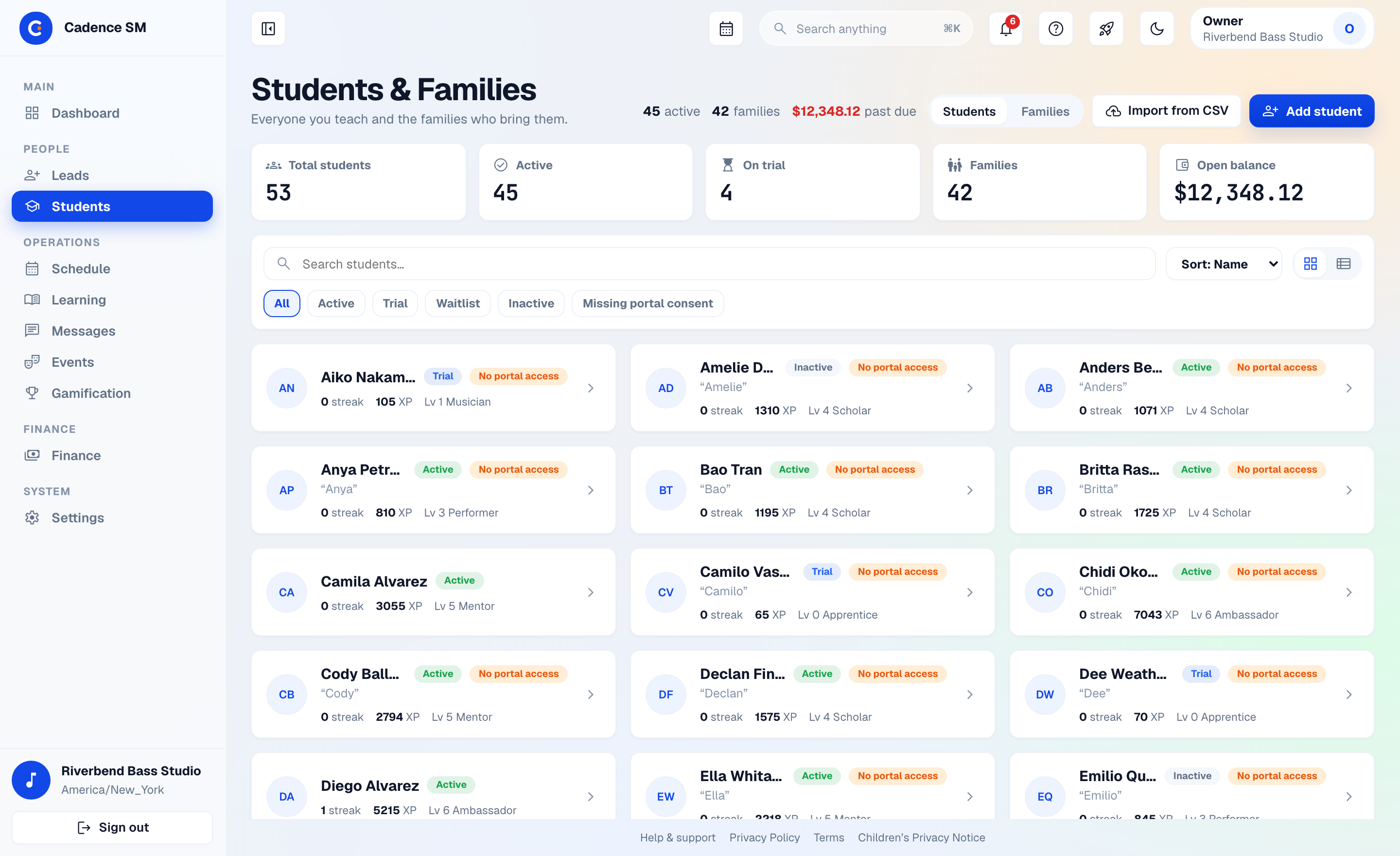
The owner portal opens on a Needs-you queue: the cancellations that fell outside policy, the expenses waiting on an approval, the recordings a teacher hasn’t answered yet. Ten sidebar entries instead of eighteen, and a command palette for everything else.
- The Needs-you queue gathers what actually needs a decision — cancellations outside policy, expenses awaiting approval, recordings awaiting feedback — on the dashboard and again beside the schedule
- ⌘K command palette: type a page, a student, a family or a lead and go straight there
- Ten sidebar entries: Dashboard, Leads, Students, Schedule, Learning, Messages, Events, Gamification, Finance, Settings
- Finance in one place — Billing Ops, Payroll, Expenses and Lending under a single entry
- Light by default, with a dark theme for the evening shift
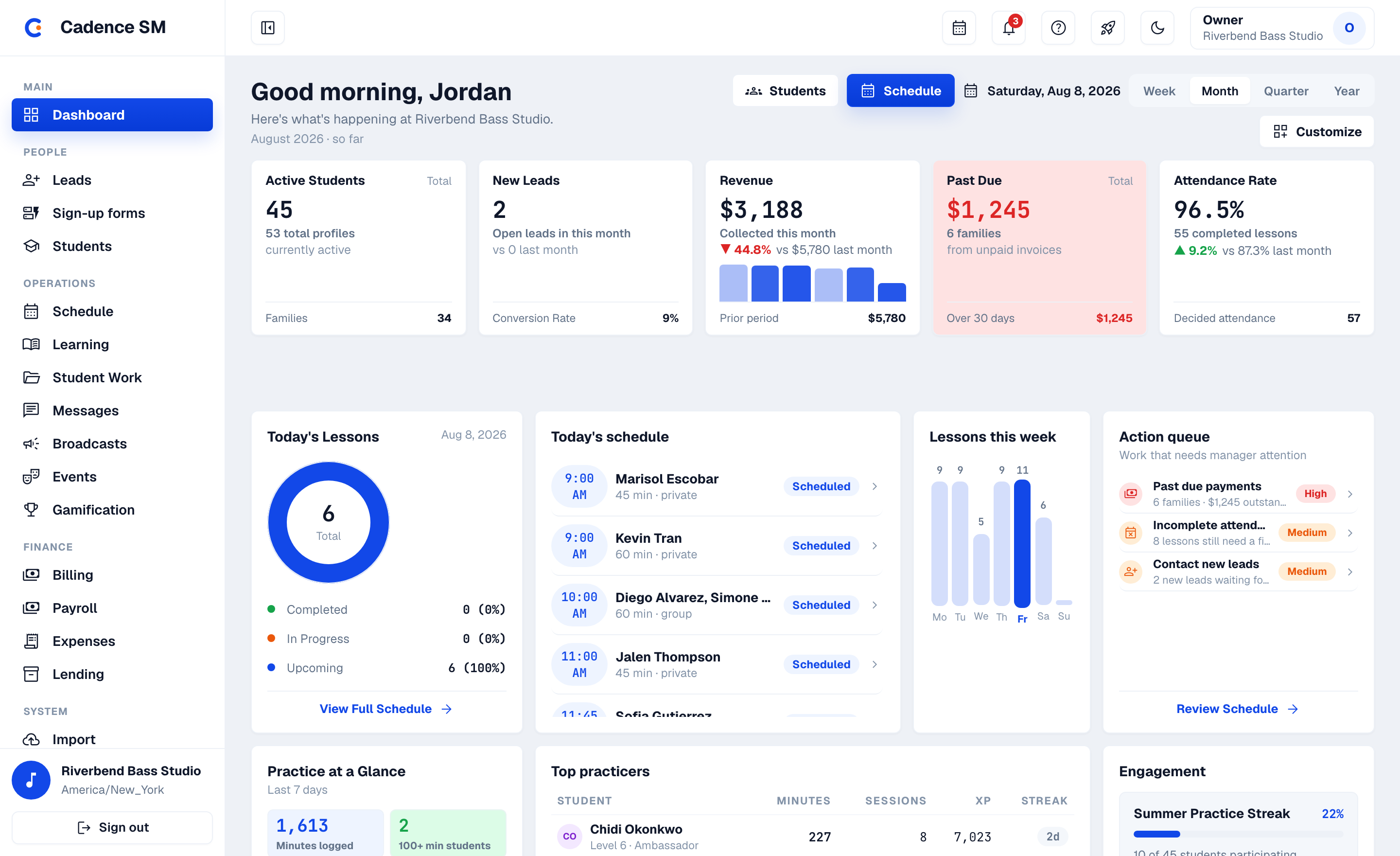
A calendar that knows how lessons actually work
Weekly lessons are recurring blocks — solo or group — that materialize into real, attendance-ready occurrences. Double-booking is caught before it happens.
- Recurring solo & group blocks with automatic occurrence generation
- Attendance tracking per occurrence, feeding billing and practice history
- Teacher availability windows with conflict checks before any booking — plus conflict detection across teachers and rooms
- Cancellation policies that mint makeup tokens by your rules; studio holidays bulk-cancel affected lessons in one action
- Waitlist & opening offers: when a seat opens, the platform ranks waitlisted and trial students who fit it and sends the family an offer they accept or decline in their portal
- Substitute coverage: a teacher requests coverage for a date range, the sub accepts in-app, and the schedule shows who’s actually teaching
- Parent self-serve rescheduling & swaps: open-slot discovery with capacity-locked booking, and parent-to-parent trades the studio approves
- Absence & cancellation requests filed from the family portal, resolved by staff; series-wide changes preview exactly what will move before you commit
- Schedule-health dashboard: teacher load, room utilization, open seats, cancellation and no-show rates, makeup-credit liability, and students with no upcoming lesson booked
- Five tabs, one page: Today, Calendar, Attendance, Requests and Openings — with the Needs-you queue in the right column
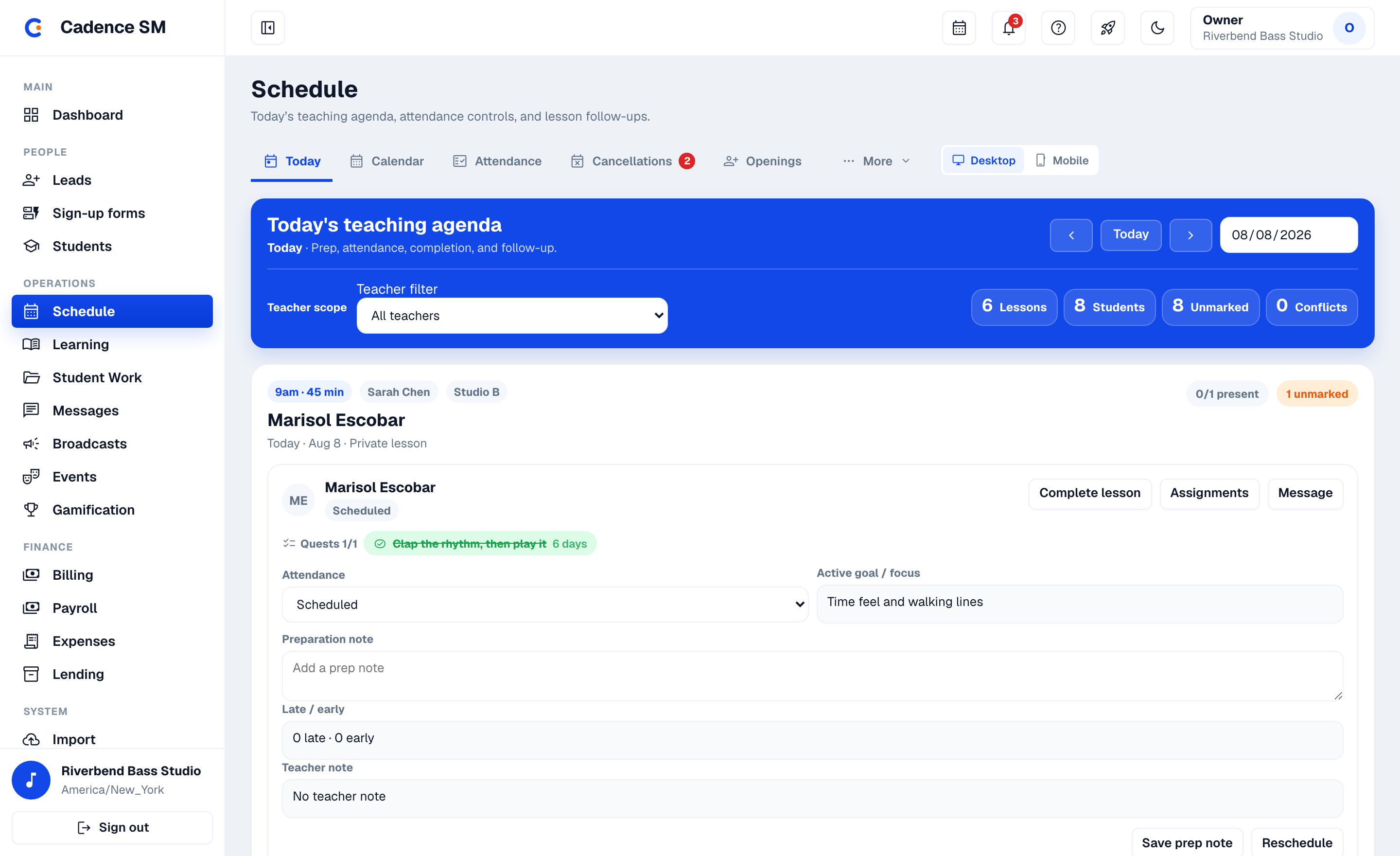
Invoices that write themselves — and get paid online
A monthly invoicing job turns rates and attendance into invoices. Families pay by card; the money lands in the studio’s own Stripe account, not ours.
- Rate-based monthly invoicing plus ad-hoc charges
- Per-lesson billing mode: charge for lessons actually taught instead of flat tuition, switchable per family, with a preflight check and clean end-of-period settlement
- Credits & recurring discounts with $0-invoice settlement and carry-forward
- Payment reminders ahead of due dates, and configured late fees that accrue automatically; refunds (partial or full), void, manual mark-paid
- Stripe Connect: each studio onboards its own account from Settings
- Parent billing UI with card, ACH bank transfer, or Link on file — bank-transfer fees are a fraction of card fees on a tuition-sized invoice — failed payments surfaced to staff
- Money-state safeguards: disputes, ACH returns and refunds are first-class; double-clicks and out-of-order payment events can’t corrupt an invoice
- Financial reports & CSV exports of invoices, payments, payroll, and expenses for the accountant
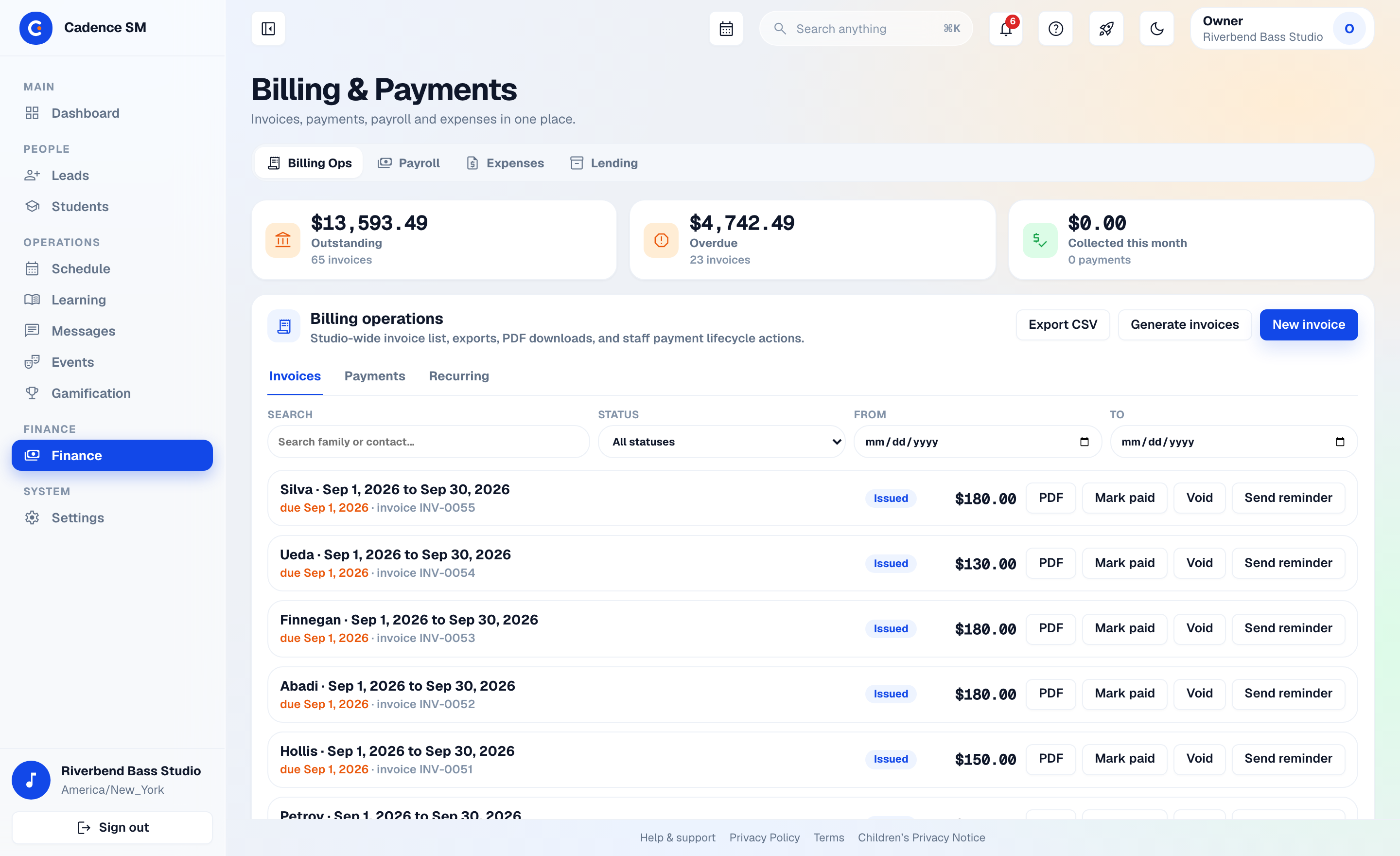
Every student, every family, one grid
Students and families live on one page, as cards, instead of two lists that disagree about who belongs to whom. The roster is the thing you look at, not the thing you export.
- One card grid for students and families together, searchable from ⌘K
- Mass import from CSV/XLSX with a preview before anything is written
- Studio instrument catalog the owner curates once — every student form offers it as a dropdown
- PIN management per student: require one or not, reset it, copy the tablet login link
- One-click lead-to-family conversion lands the new family here, no re-typing
- Family enrolment invitations — send a link and the parent fills in their own contact details and children, or create the family yourself and send a portal invite; either way nobody retypes a roster
Your studio’s musical memory
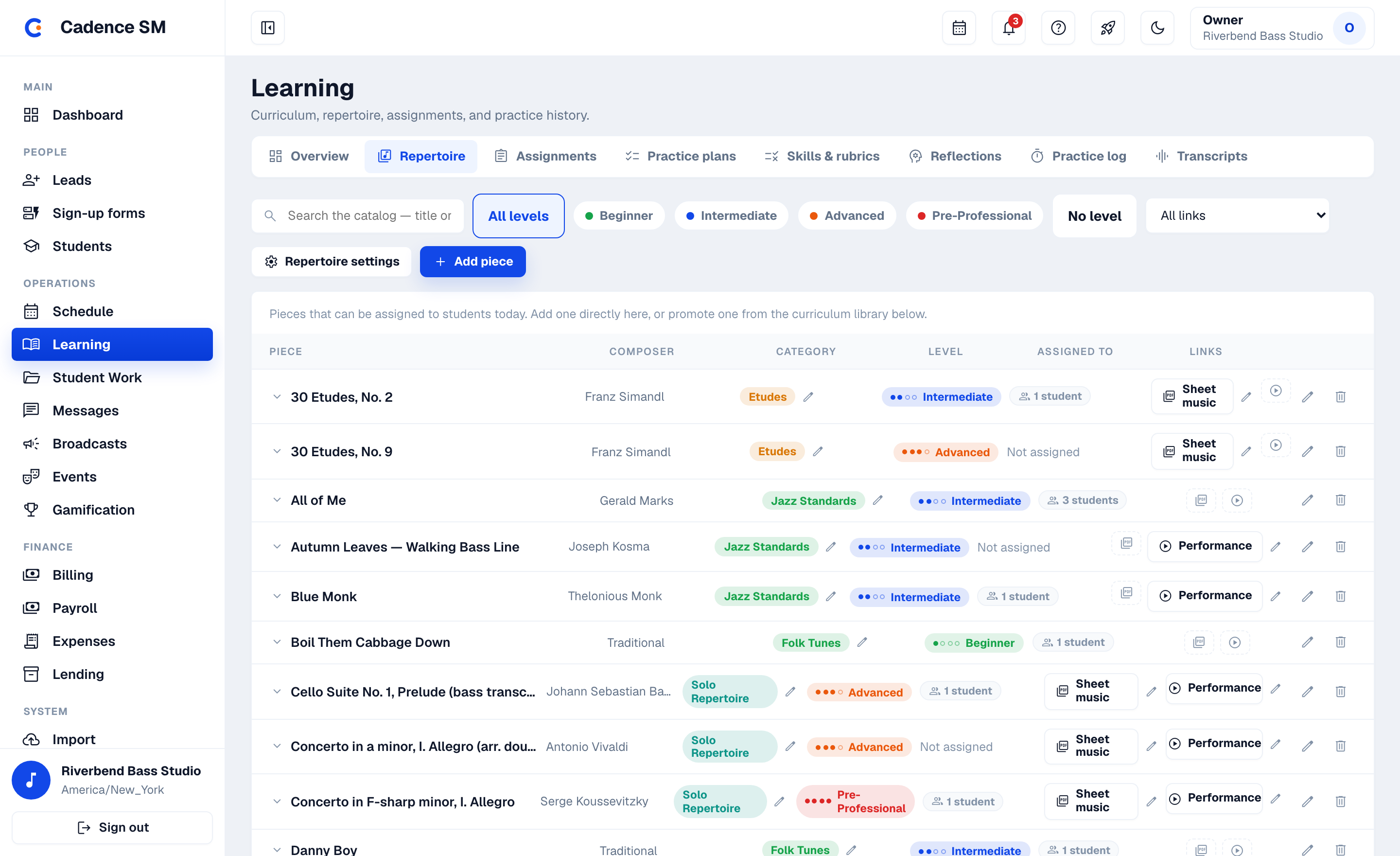
Every piece a student touches moves through a real lifecycle — assigned, learning, passed, performed — in an append-only history nobody can quietly rewrite. Three years in, "what has she learned here?" has a list, not a shrug.
- Your vocabulary, not ours: piece types, categories and skill levels are minted by your studio — a Suzuki studio and a conservatory-prep program don’t sort music the same way, and this doesn’t make them
- The performance record: pieces graduate from learning to passed to performed — students see "Performed!" land on their own timeline
- Assignments that carry weight: due dates, milestones with reusable presets, attachments, and rubric-scored assessments
- Skill maps tie pieces to the skills they build, with per-student progress
- Rubric assessments: skill ladders per instrument with criteria at each level, and formal assessment snapshots parents and students can see
- Curriculum versioning with draft → approved governance, so the syllabus is a decision, not a rumor
- Export & import curriculum packages between studios — checksummed, with provenance — so a multi-location studio teaches from one book
- Sheet music and reference videos attached to the piece itself — the part, the recording and the purchase link travel with the repertoire entry, so a student on the Music tab is never hunting for what to read
The lesson doesn’t end when the student walks out
The week between lessons is where students are made. Practice plans, a real timer, reflections and recordings give that week structure — and give the teacher a truthful account of it: planned versus actual, item by item.
- Practice plans & templates with per-item bpm/measure targets
- Guided practice sessions: a full-screen mode walks the plan item by item with timers and a wrap-up reflection; planned-vs-actual is recorded, and an interrupted session resumes right where it left off
- Practice recordings & teacher review: takes arrive in a staff review queue, feedback lands in the student’s portal, and responding to it earns XP
- Built-in chromatic tuner & metronome in the student portal — free tuning, target-note practice, and sustained drone tones, octave-transposable and instrument-aware for transposing instruments, plus a rhythm trainer with tempo ramps and internal-pulse gap measures where the click goes silent but the visual beat keeps moving
- Crash-proof sessions: a tablet dying mid-practice restores the session, checked items and all
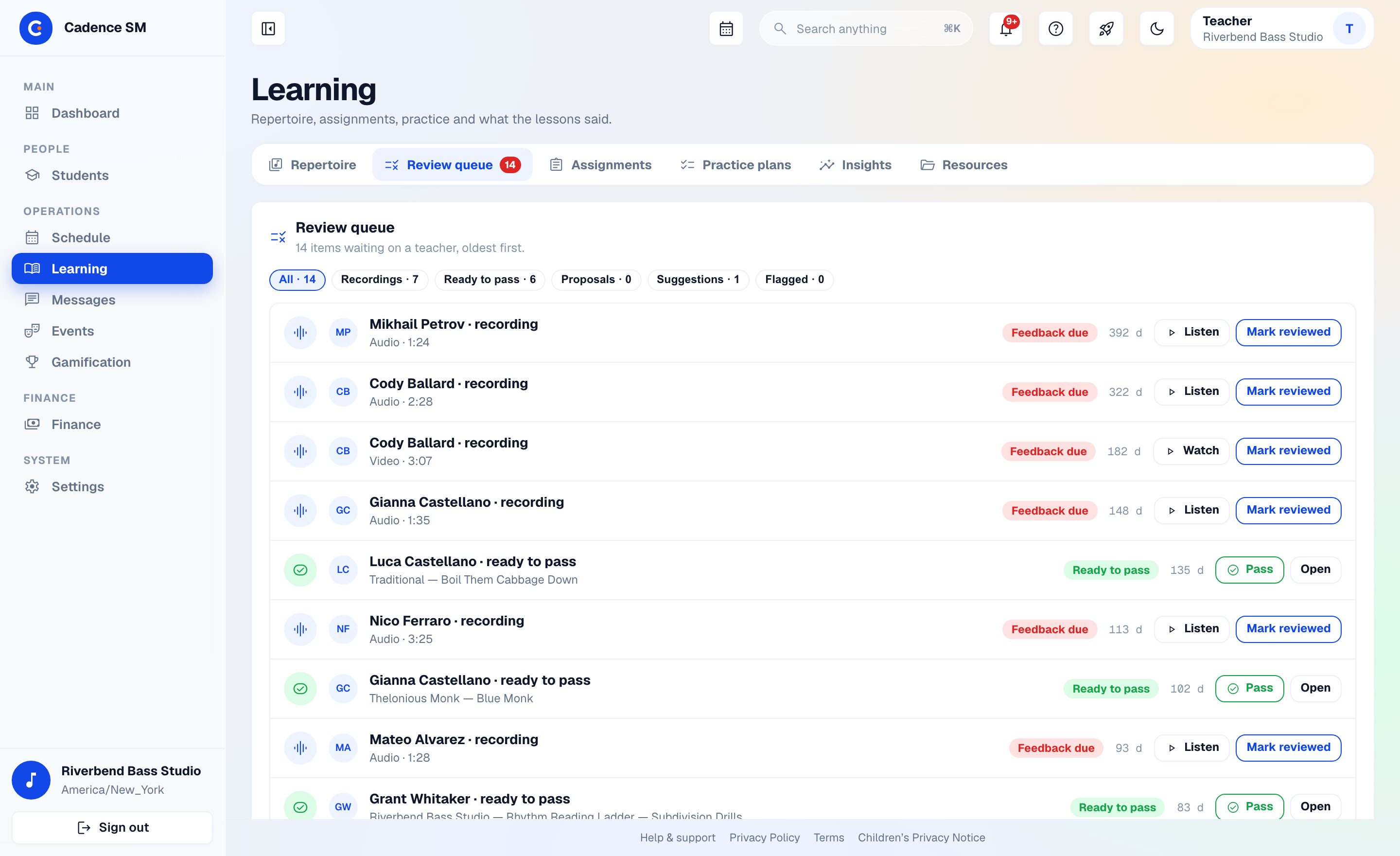
Everything waiting on a teacher, in one column
Learning › Review queue is where the week between lessons lands: the recordings students sent, and the practice sessions that look too good to be true. Feedback goes back to the student’s portal; answering it earns them XP.
- Recordings awaiting feedback — listen, respond, done; the response lands in the student’s portal
- Practice-outlier review: the session that somehow ran straight through dinner gets a human look before the leaderboard believes it
- Surfaces on the Needs-you queue too, so nothing waits past the next lesson
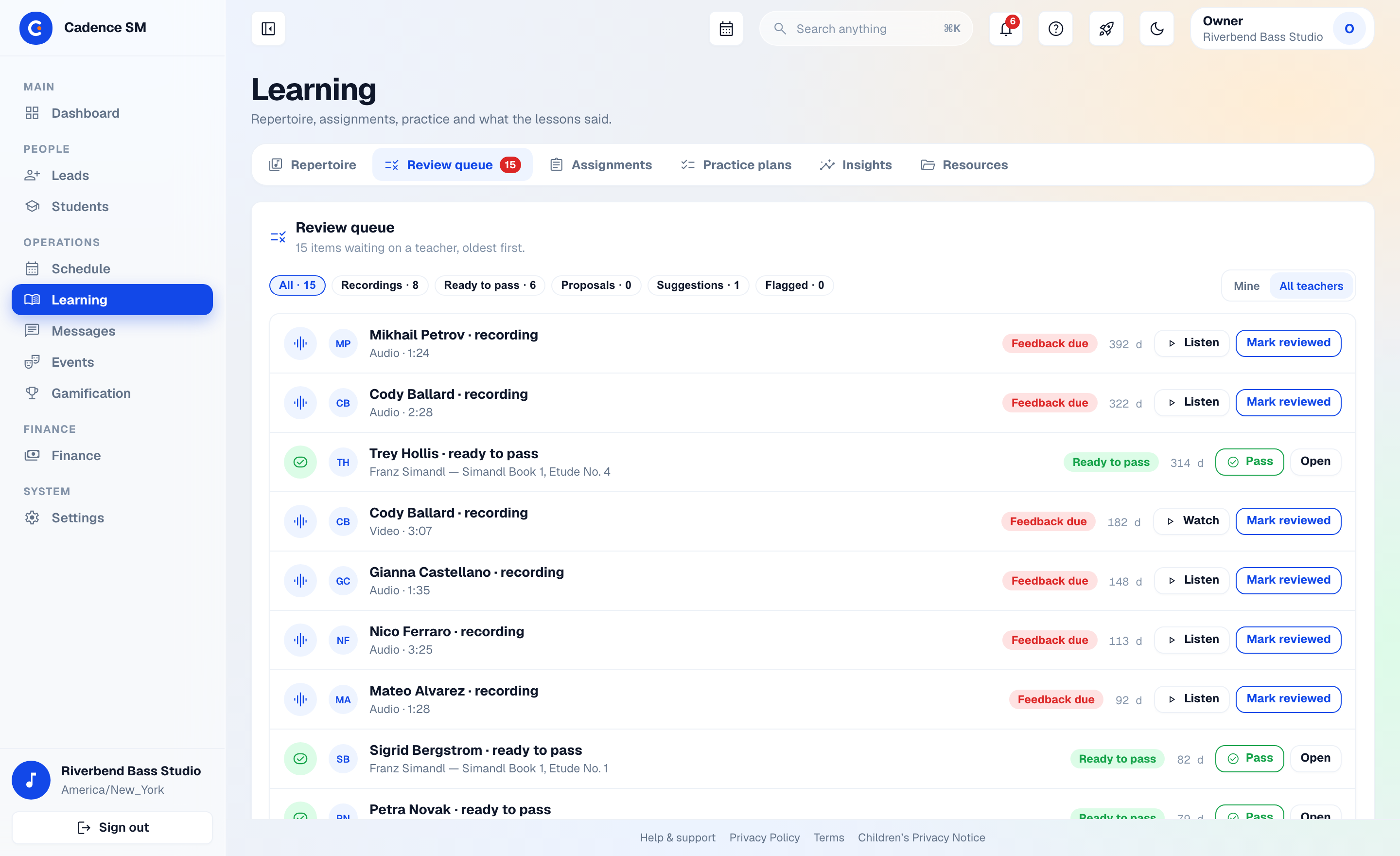
A game your studio designs, not a sticker chart you rent
The XP values, the level curve, the streak requirements, the badges — all of it is yours to set. Motivation only works when it carries your studio’s standards, so this system was built to carry them.
- XP & levels on your terms: you decide what each practice event is worth and what every level costs
- Streaks with standards: pick the practice categories a day must include before it counts — skip your scales, stall your streak — with teacher-granted freezes for sick weeks
- Quests turn assignments into completable goals, and multi-stage skill pathways mark the longer journey
- Custom badges & challenges (including recurring ones), plus reflection prompts written in your studio’s voice
- Rewards store with redemption locking — no double-spends
- Platform-enforced anti-cheat ceilings — no studio configuration can make XP grinding profitable
- Recognition wall & leaderboards, opt-out per student and staff-controlled
- Practice-outlier review queue: the session that somehow ran straight through dinner gets a human look before the leaderboard believes it
Parents get a real portal, not a payment link
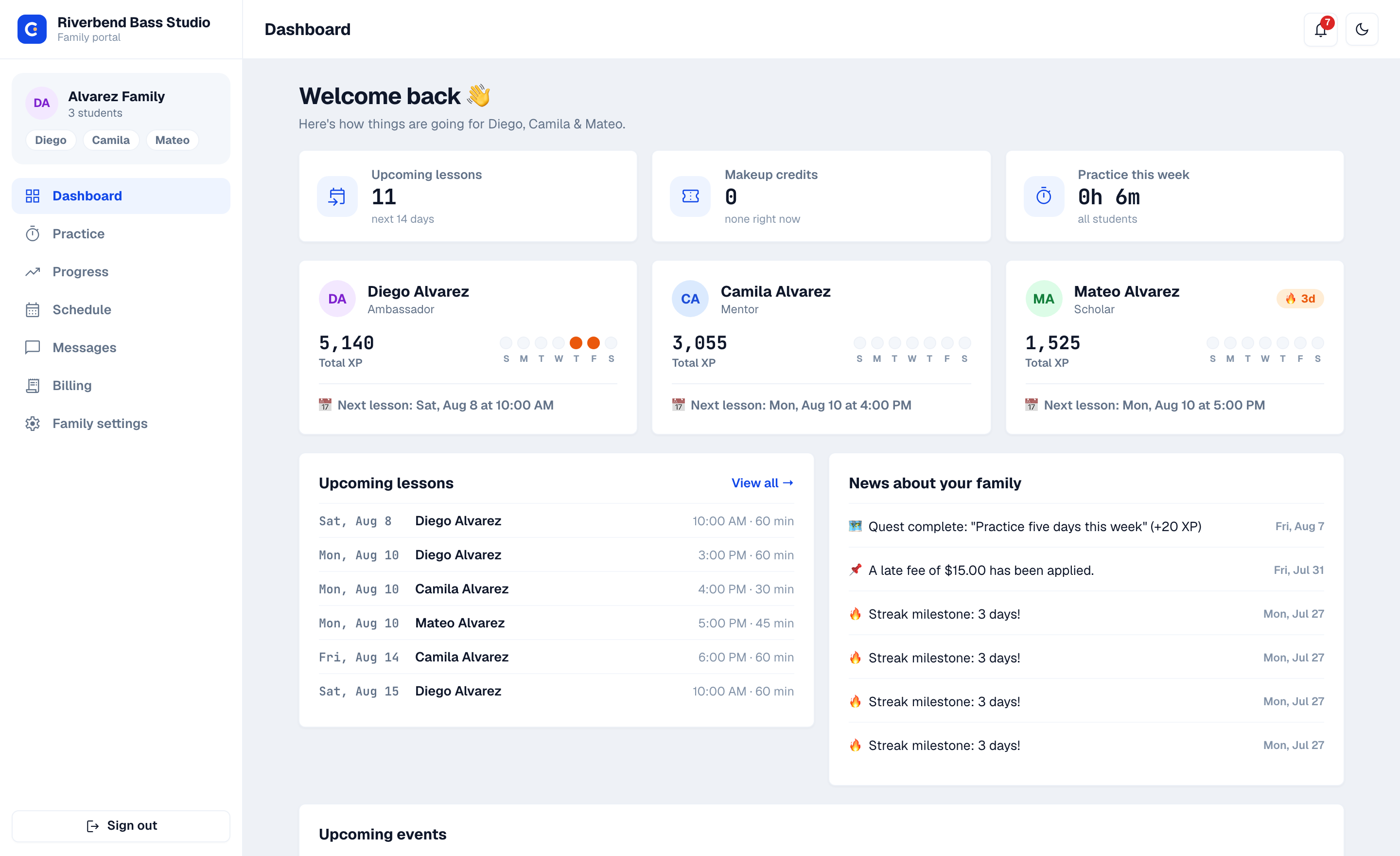
One login shows every child on five tabs — Home, Schedule, Progress, Messages, Billing — with the routine paperwork parents can simply handle themselves. It runs in any phone’s browser, and families get in by invitation from the studio rather than by signing themselves up.
- Joining is an invitation — staff send an enrolment link; the parent enters contact details, adds their children and accepts the terms, and the account is live without an approval queue
- Family Home: streaks, next lessons, makeup credits, studio news per child
- Lesson times in the calendar they already use — a subscribed feed that keeps Apple, Google or Outlook current as the schedule changes, rather than a one-off export that goes stale
- Notifications reach both parents — messages, reminders and billing notices fan out to co-parents on the account
- “Can’t make it” on any lesson previews what the policy will do before the parent confirms
- Self-service settings: contact & emergency info, student instrument/school, and PIN management — require one or not, reset it, copy the student’s portal link
- Billing in the portal: card or US bank account on file, invoices, one-tap payment
- Event signups, swaps and absence requests without an email thread
- Per-scope parental consent: media, messaging, and recordings — each independently grantable and revocable
- Self-serve data deletion: a family can request erasure of their child’s data, with a 30-day cancelable grace period
The Practice Room, in their pocket
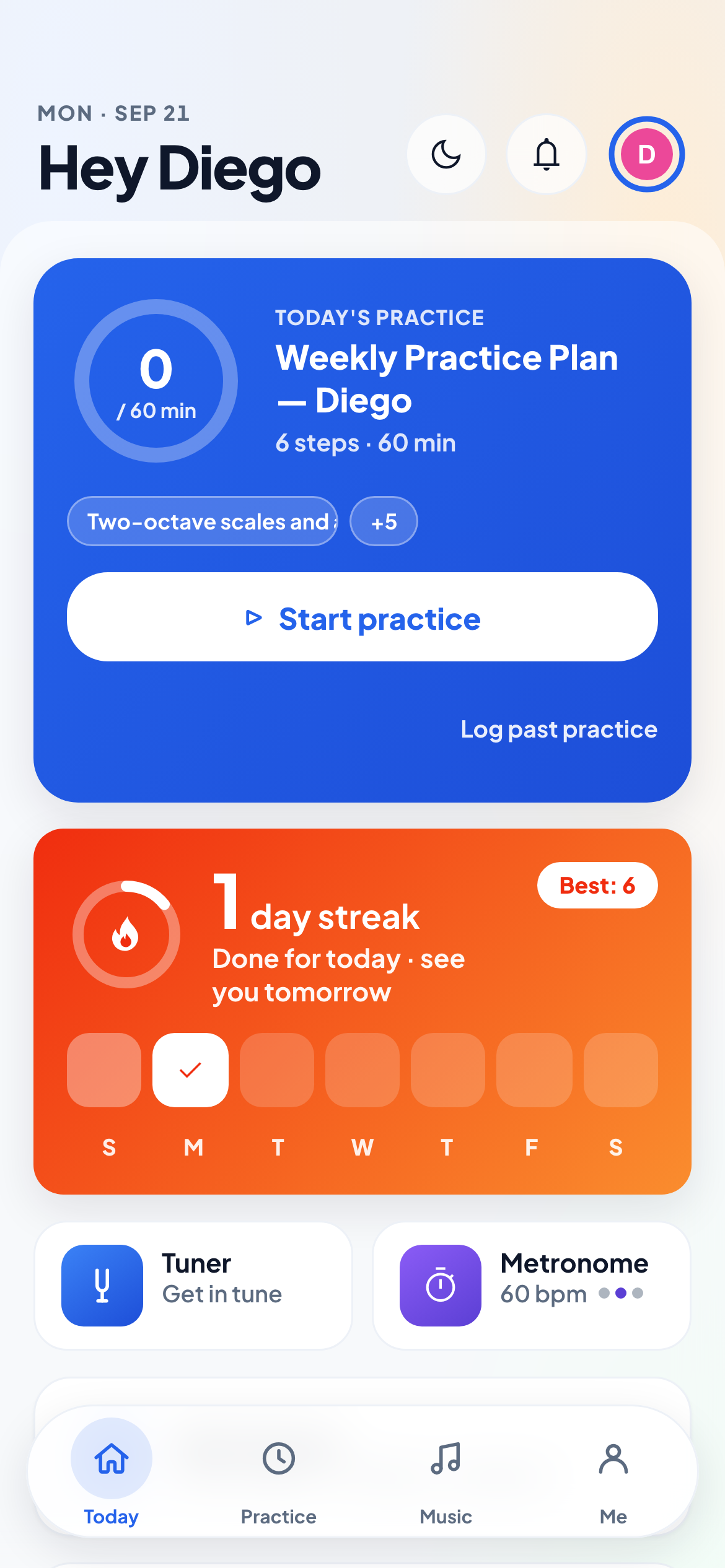
The Practice Room is the student’s half of Cadence SM. Four tabs — Today, Practice, Music, Me — with today’s plan, a timer, a tuner, a metronome and the XP they’re chasing. Nothing they shouldn’t see.
- PIN sign-in built for shared studio tablets — no child email accounts
- A portal link or a QR code the studio hands out, plus a guided step that adds the Practice Room to a phone’s home screen — verified on iOS. It opens from an icon like an app, with nothing to download from an app store
- Sessions that last 30 days, so a student who practises on Thursday isn’t locked out by Sunday
- Today opens on the practice plan, the streak card and the next lesson; Me holds level, badges, rewards and the light/dark switch
- Chromatic tuner & metronome with tap tempo and per-beat accents
- The practice timer runs the day’s plan and records planned-vs-actual
- Guided reflections & recordings flow straight to the teacher
Every conversation where it belongs
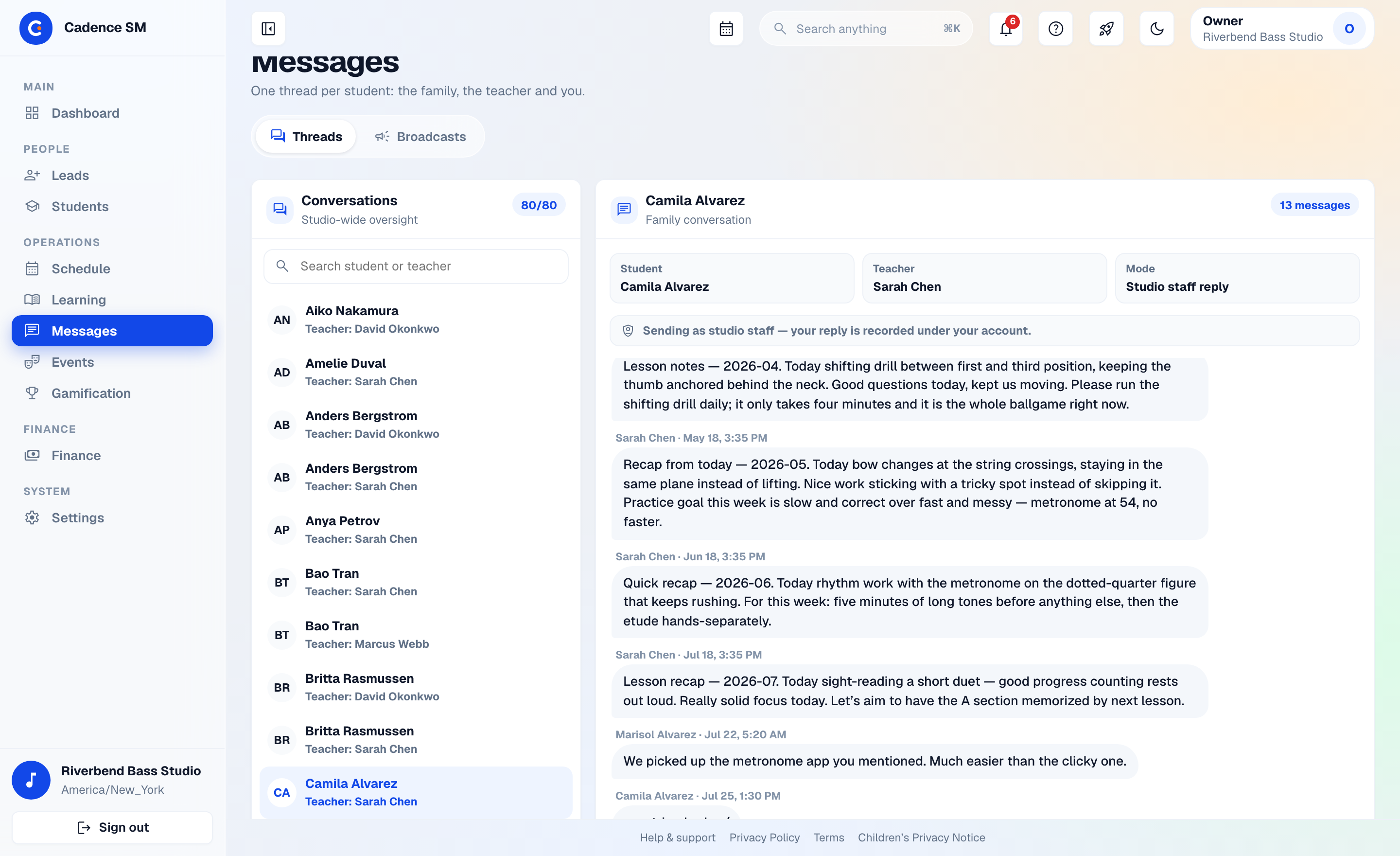
Parents rarely ask it out loud, but they want to know what gets said to their child one-on-one. Chat is organised per student, in a channel the family can see — so context never gets lost, and there is no mechanism anywhere in the system for a private teacher–minor DM. Around that sits the part that saves you the group text: reminders and notices that go out on their own, through the channel each family actually reads.
- Auto-created per-student channels; canned phrases for young students
- Four delivery channels — in-app, email, push notification and text message — from one notification system, so a studio isn’t choosing between a portal nobody opens and a group text nobody can search
- Lesson reminders go out 24 hours ahead in the studio’s timezone, on by default; practice reminders are opt-in per family, with quiet hours
- Push notifications reach parents and students on the device they already carry, with a per-student switch a parent controls
- Text reminders for the families who only read texts — enabled per studio, opt-in per family, and held inside daytime sending hours
- Broadcasts live inside Messages — broadcast email with per-recipient delivery reports, one door instead of two
- Notification preferences per studio and per family
From inquiry to recital program
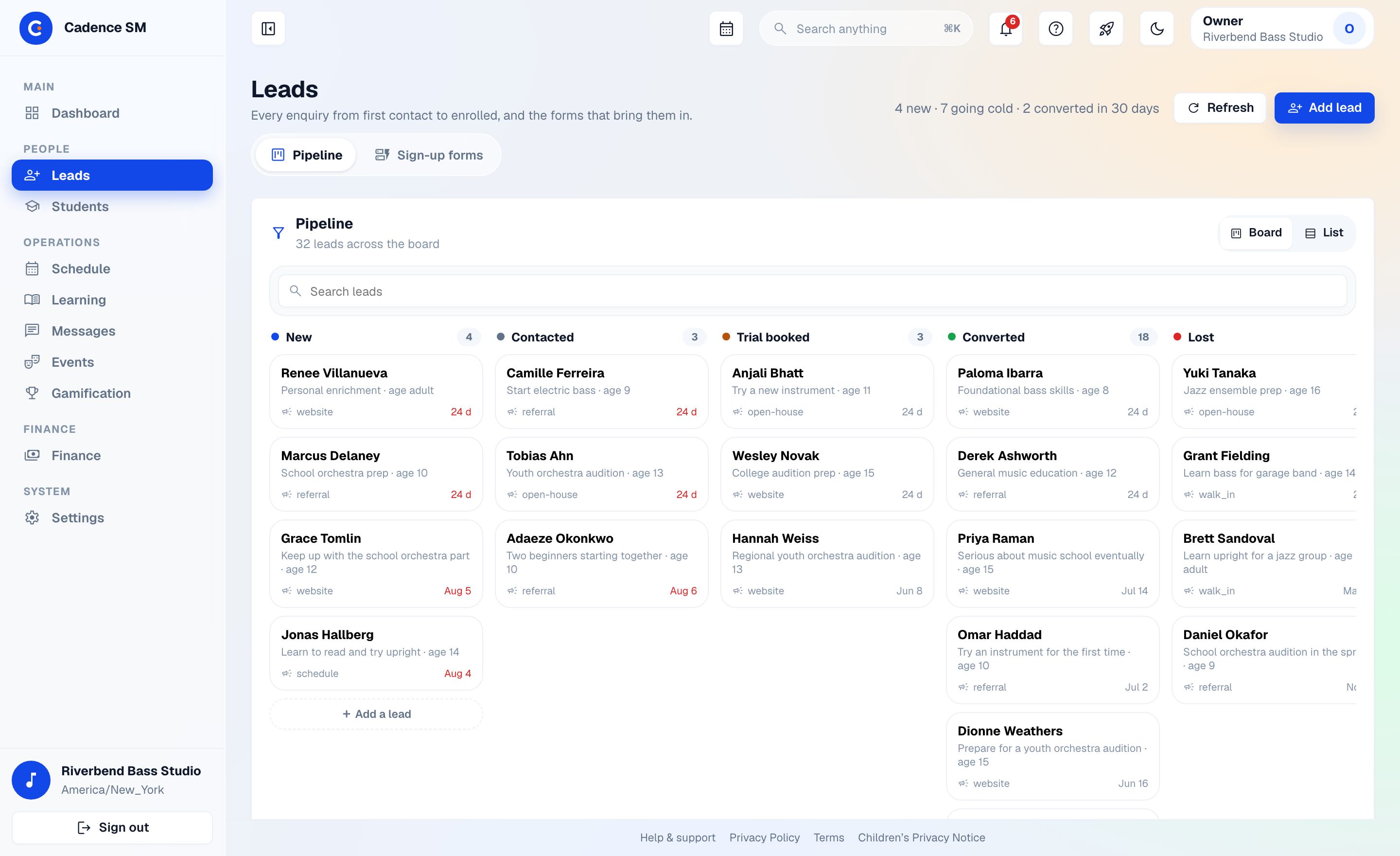
An embeddable lead form feeds your Leads board and notifies you instantly — say yes, and one click turns them into a family. Recitals get capacity-safe signups and a printable, ordered program built from actual repertoire.
- Embeddable lead-capture form — your fields, your colors, your copy — dropped into the studio’s existing website with one small script tag; spam protection (CAPTCHA, honeypot, rate limiting, domain allowlisting) built in and invisible to real families, straight into the CRM
- A pipeline board: New, Contacted, Trial booked, Converted, Lost — plus a Sign-up forms tab for the embeds themselves
- Owner notification on every new lead
- One-click lead-to-family conversion: when a lead says yes, one action creates the full family account, no re-typing
- Events & recitals: capacity-safe parent signups
- Program builder with repertoire-driven suggestions and printable output
The unglamorous stuff, handled
The back office is part of the product, not an exported CSV problem.
- Mass import from CSV/XLSX with a preview before anything is written
- Drag-and-arrange staff dashboard of fifteen widgets — action queue, today’s lessons, revenue trend, lead pipeline, top practicers — saved per user
- Role-tailored guided tours that start automatically for a brand-new studio
- Payroll runs with per-teacher rate rules
- Expense & mileage ledger with an approval workflow
- Instrument lending & catalog: checkouts, returns, overdue tracking, plus a studio instrument catalog the owner curates once — every student form offers it as a dropdown
- Private lesson transcription — recorded lesson audio is transcribed by a speech model running on servers we operate, never sent to a third-party AI service, and deleted as soon as the job finishes. Studios control who can read a transcript and how long it is kept.
- Birthday heads-up emailed to the owner a week ahead, in your timezone
See it with your studio's real schedule
Early-access onboarding is guided: we walk through Cadence SM on your actual teaching week, then run your roster import together with a preview before anything is written.
Request early access